
Sales Pipeline Management for Service Businesses: Build Predictable Revenue
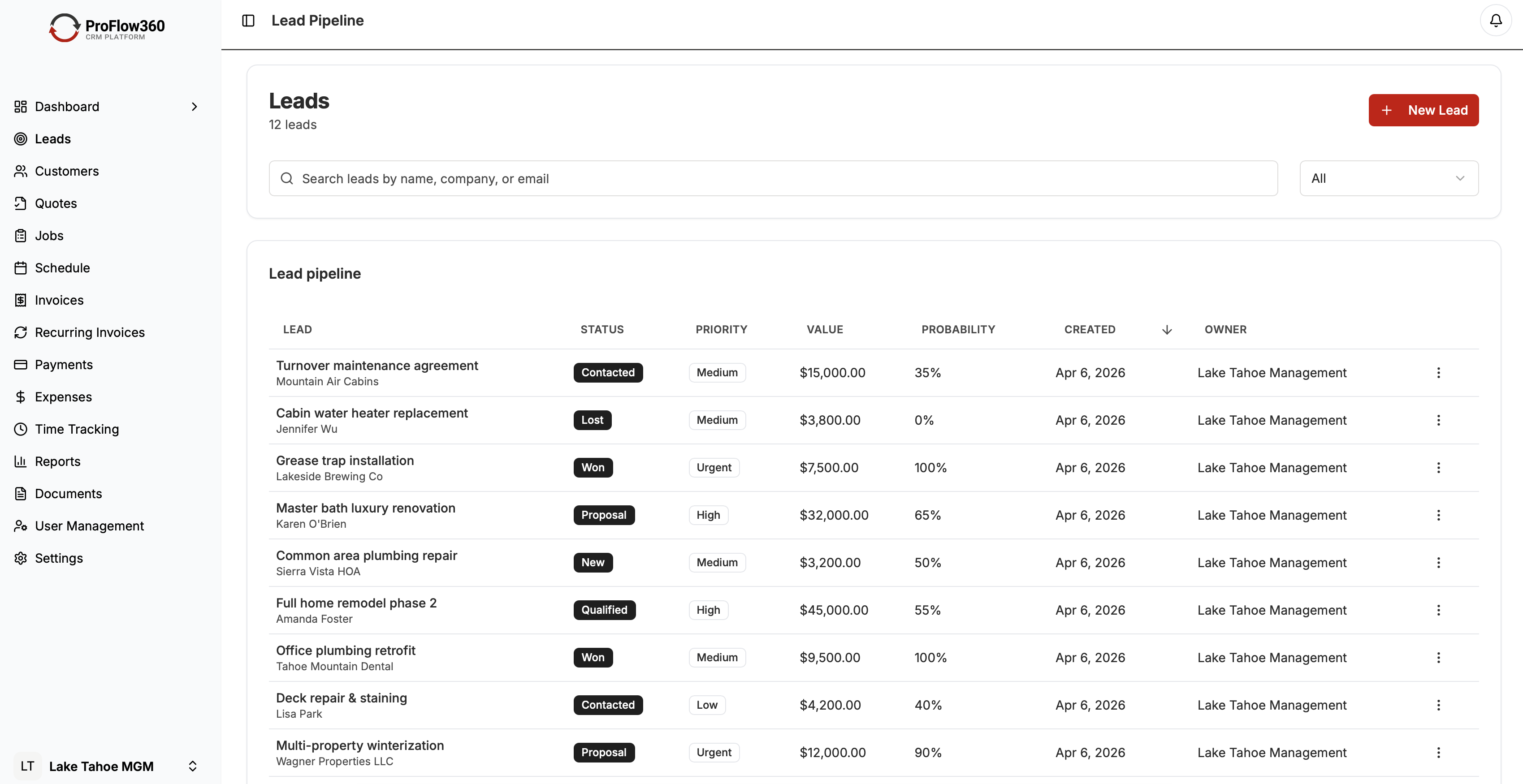
Most service businesses don't have a sales pipeline problem. They have a visibility problem. The work is there — leads coming in, estimates going out, jobs getting booked. But it's all in people's heads, scattered across texts and emails, and nobody can answer the basic question: "What's in the pipeline right now and what's it worth?"
A sales pipeline solves that. This guide covers how to build one that reflects how a service business actually works, what to track in it, and how to use it to forecast revenue and manage follow-up. Last updated April 2026.
What a Sales Pipeline Is (and Isn't)
A sales pipeline is a visual representation of every open opportunity, organized by stage. For a service business, "opportunity" means any potential job — an active lead, an estimate out for signature, a scheduled job not yet confirmed.
A pipeline is not a task list. It's not a customer database. It's a live snapshot of revenue in motion.
The value of pipeline visibility is direct: you can see what's about to close, what's stalled, and what needs attention. Without it, revenue surprises you — both in good months and bad ones.
Building Your Pipeline Stages
The right stages depend on your business model, but most service businesses have a version of these five:
1. New Lead — Inquiry received, not yet contacted. Time in this stage should be measured in hours, not days. Our lead management guide covers why the first 5 minutes make or break your close rate.
2. Contacted / Qualifying — First contact made. Gathering enough information to determine if this is a real opportunity: right service area, right budget range, ready to move forward.
3. Estimate Sent — Quote or proposal delivered. Waiting for customer decision.
4. Scheduled / Confirmed — Job is booked. Waiting for work to begin.
5. Completed / Invoiced — Job is done. Invoice is sent or payment received.
Some businesses add a "Negotiating" stage between Estimate Sent and Scheduled if quote revisions are common. Others split "Scheduled" and "In Progress" for multi-day jobs. Keep it as simple as accurately represents your workflow.
Configuring Stages in ProFlow360
ProFlow360's pipeline is pre-built with service business stages as the default. Customize the names to match your terminology — "Quoted" instead of "Estimate Sent," "On the Books" instead of "Scheduled" — so your team uses language they recognize without thinking.
Color-code stages by age: green for less than 3 days, yellow for 4–7 days, red for 8+ days. This makes stalled opportunities visible at a glance without running a report.
Pipeline Metrics That Matter
You can track dozens of pipeline metrics. These five are the ones that actually drive decisions:
Conversion rate by stage. What percentage of leads convert from New Lead to Contacted? From Contacted to Estimate Sent? From Estimate Sent to Scheduled? Each drop-off point tells you where to focus improvement. If you're losing 60% between Estimate Sent and Scheduled, the problem is in your follow-up or pricing, not your lead generation.
Average deal size. The average revenue per booked job, segmented by service type. Knowing this lets you calculate how many jobs you need to hit revenue targets.
Sales cycle length. Average days from New Lead to Scheduled. For most residential service businesses, this should be 3–10 days. If it's running 30+ days, leads are going cold before close.
Pipeline value by stage. Total dollar value of opportunities at each stage. This is your revenue forecast. If you need $50,000 in revenue next month and you have $30,000 in the Estimate Sent stage with a 60% close rate, you need more top-of-funnel activity.
Stale opportunity rate. What percentage of open opportunities haven't had any activity in the past 7 days? High stale rates mean follow-up is breaking down somewhere.
Managing the Pipeline Weekly
A pipeline is only useful if it's current. Build a weekly pipeline review into your operations:
Every Monday morning (15 minutes):
- Review anything in the "New Lead" stage more than 24 hours old. Why hasn't it moved?
- Review anything in "Estimate Sent" more than 5 days old. Does it have a follow-up task scheduled?
- Identify the three highest-value open opportunities and confirm there's an active next step for each.
- Check pipeline value against revenue target. Are you on track?
This is not a 90-minute meeting. It's 15 minutes with the pipeline dashboard open, running through a checklist.
Forecasting Revenue From Your Pipeline
Pipeline value × stage-weighted conversion rate = expected revenue.
If your historical conversion rates are:
- New Lead → Scheduled: 30%
- Contacted → Scheduled: 45%
- Estimate Sent → Scheduled: 65%
And your current pipeline has:
- $20,000 in New Lead stage: 30% × $20,000 = $6,000 expected
- $15,000 in Contacted stage: 45% × $15,000 = $6,750 expected
- $30,000 in Estimate Sent stage: 65% × $30,000 = $19,500 expected
Your 30-day revenue forecast is approximately $32,250.
ProFlow360's forecasting report does this math automatically once you've logged enough historical conversion data. In the meantime, track your conversions manually for 60–90 days to establish your baselines.
Common Pipeline Problems and Fixes
Problem: Pipeline is full but nothing is converting. Likely cause: Poor lead qualification. Opportunities are moving in but not closing because they were never real — wrong geography, wrong budget, not ready to buy. Fix: Add qualification criteria to the "Qualifying" stage and be stricter about what gets moved to Estimate Sent. A smaller, tighter pipeline is more useful than a large, noisy one.
Problem: High drop-off at Estimate Sent. Likely cause: Estimates going out without follow-up. Fix: Configure an automation that creates a follow-up task 3 days after an estimate is marked Sent. Most service business deals close on the follow-up, not the estimate.
Problem: Pipeline data is stale and nobody trusts it. Likely cause: Updating the pipeline is optional or extra work. Fix: Make pipeline updates part of the job close-out process. Before a job gets marked complete, the pipeline record has to be updated. Tie this to invoicing — no invoice generated without the pipeline record current.
Problem: Conversion rates fluctuate wildly month to month. Likely cause: Small sample sizes in each stage, or inconsistent stage definitions. Fix: Standardize stage definitions in writing. If "Estimate Sent" means different things to different people, conversion rate data is meaningless. Write one sentence defining each stage, add it to onboarding documentation, and enforce it.
Pipeline for Multi-Tech Operations
If you have multiple technicians handling their own estimates, you need pipeline visibility across all of them without creating a management burden.
Configure ProFlow360 so each tech's opportunities are visible to them individually plus to management. Role-based pipeline views let managers see the full picture while techs see only their own work. Weekly pipeline reviews can be individual or group, depending on your team size.
For larger teams, assign a pipeline owner per territory or service type who is responsible for the health of that segment — keeping stages current, following up on stale opportunities, and surfacing problems before they become misses.
Integrating Pipeline With Scheduling
The handoff between "Scheduled" in the pipeline and the actual job schedule is where service businesses commonly lose coordination.
In ProFlow360, a job moving to "Scheduled" stage automatically triggers a scheduling task and can push to your dispatch calendar. This eliminates the manual handoff where someone has to remember to put the job on the calendar after the customer confirms.
Treat the pipeline and the schedule as two views of the same data — not two separate systems that need to be reconciled manually.
Conclusion
A sales pipeline gives you something most service businesses don't have: visibility. You can see what's coming, what's stalled, and what needs action before opportunities expire.
Building one is less about software and more about discipline — maintaining consistent stages, updating records as jobs move, and reviewing the data weekly. The CRM makes it easy to maintain. The discipline makes it useful.
ProFlow360 ships with a service business pipeline pre-configured — explore the full feature set. Setup takes an afternoon; reliable revenue visibility follows shortly after.
Tags
Mark Shvaya
Founder, ProFlow360
Sacramento-based broker and property manager. Built ProFlow360 to solve the operational chaos he lived through managing 50+ doors and a field service team.