Integration
Rentvine inspections with ProFlow360
Read your properties, units and tenants from Rentvine, then run move-in, routine and move-out inspections that end in one organized record per tenancy.
Last reviewed
- 212
- Properties
- 486
- Units
- 431
- Tenants
Last sync 6 min ago · manual entries never overwritten
Sync run · today 9:14 AM
Read-only- Properties212 read2 new
- Units486 read3 updated
- Tenants431 readcurrent from lease dates
- Added by hand9 propertiesleft untouched
- Writes to Rentvinenoneno write path
On this page
Short answer
ProFlow360 connects to Rentvine through a read-only sync. It brings in properties, units and tenants, reads lease dates to find current residents, and never writes back to Rentvine or overwrites anything you added by hand. On top of that list, ProFlow360 runs the inspection-to-evidence chain: capture, comparison, classified findings and a sealed record.
What does the Rentvine sync bring into ProFlow360?
| Data | From Rentvine | Notes |
|---|---|---|
| Properties | Yes | Matched by Rentvine identity; manual properties are skipped |
| Units | Yes | Created or updated under each property |
| Tenants | Yes | Tenants without an email are listed, but a resident link cannot be sent yet |
| Lease dates | Yes | Read to work out who is current; rent and balances are not used |
| Inspections, photos, findings | No | Created and kept in ProFlow360 |
| Work orders, ledgers, payments | No | Not read, not written; ProFlow360 is not a PMS |
What does ProFlow360 never do to your Rentvine data?
- It never writes. The Rentvine client only makes read requests. Nothing ProFlow360 does can change a Rentvine record.
- It never overwrites manual records. A property you created by hand is not overwritten, merged away or deleted by a sync.
- It never becomes your system of record. Rentvine stays the source of truth for properties, leases and money. ProFlow360 keeps the inspection evidence.
How do you connect Rentvine to ProFlow360?
- In Rentvine, create an API key and secret for the integration.
- In ProFlow360 on the web, open Settings, then Integrations, and enter your Rentvine account code (the subdomain in your-code.rentvine.com), the API key and the secret. The secret is stored encrypted and never displayed back.
- Run a sync. The summary shows what was created, updated, and skipped because it was added by hand.
- Run it again whenever you want the property list refreshed.
What do Rentvine users get from ProFlow360 on top of the sync?
The sync saves typing. The product is what happens next: every inspection for a unit is filed under the tenancy it belongs to, so at move-out each photo sits beside its move-in match, findings are classified as normal wear and tear, damage, cleaning or other, and the result is one chronological evidence package that is sealed when issued.
Camera roll
IMG_4471 … IMG_4519
Shared drive
/2417 Alder/Move in (2)
Condition PDF
Signed Jul 12, never opened
Text thread
“here are the pics”
Invoice email
RE: counter repair
Deposit sheet
Amounts, no evidence
Unit B · one tenancy
One recordMove-in inspection
Jul 12, 2024 · 64 photos
Periodic inspection
Jan 18, 2025 · 41 photos
Move-out inspection
Sep 30, 2026 · 71 photos
Invoice attached
Oct 2, 2026 · Counter repair
Record issued
Oct 4, 2026 · Revision 1 · sealed
Which other inspection apps integrate with Rentvine?
Several do. As of October 2026, zInspector, RentCheck and SnapInspect each list a Rentvine integration on their own websites, and some sync reports or work orders back into Rentvine. If two-way sync is what you need, look at those. If you want Rentvine left untouched and a sealed move-out record on top, that is what ProFlow360 is built for. Side-by-side comparisons: zInspector, RentCheck, SnapInspect.
Do this in ProFlow360
Run your next move-out on your Rentvine units
Rentvine sync is part of Portfolio Unlimited. The free plan lets you try the inspection workflow on 3 properties first, added by hand.
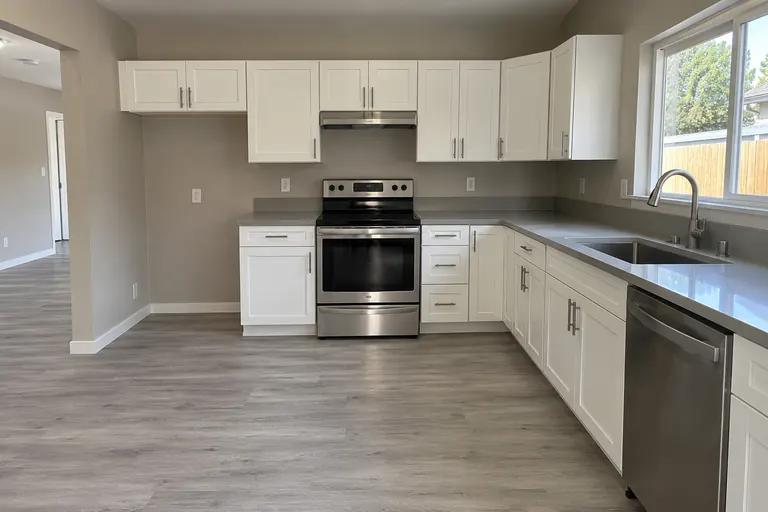
Move-in · Jul 12, 2024
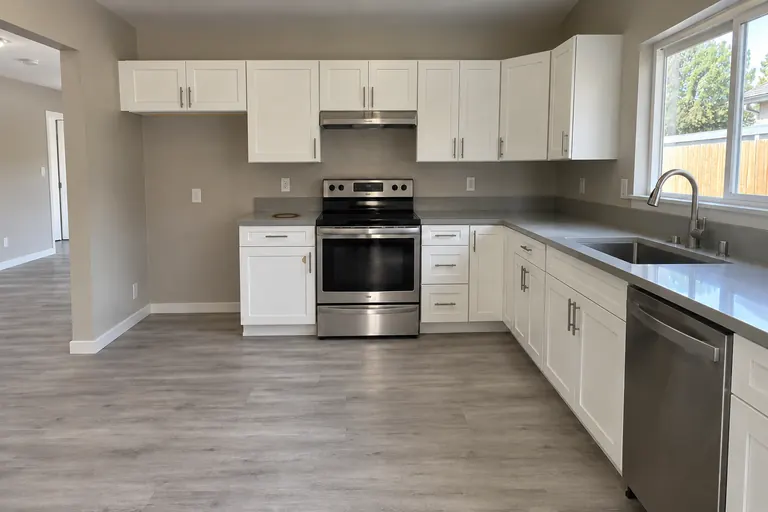
Move-out · Sep 30, 2026
Questions about the Rentvine integration
Does ProFlow360 write anything back to Rentvine?
No. The Rentvine connection only makes read requests; there is no write path. Inspection reports and evidence stay in ProFlow360 and are shared from there.
What does the Rentvine sync bring into ProFlow360?
Properties, units and tenants. It reads lease dates to work out which residents are current, so an inspection link goes to the person living there now.
What happens to properties I added by hand?
They are left alone. A sync never overwrites, merges away or deletes a property you created manually. Where a record is linked to a Rentvine identity, Rentvine wins for that identity.
How do I connect Rentvine?
In ProFlow360 web settings, under Integrations, enter your Rentvine account code and an API key and secret from Rentvine. The secret is stored encrypted and never displayed back. Then run a sync.
Do other inspection apps integrate with Rentvine?
Yes. zInspector, RentCheck and SnapInspect each list a Rentvine integration on their own sites, and some of them sync reports or work orders back to Rentvine. ProFlow360 is read-only by design.
What if I disconnect Rentvine?
Synced properties, units and tenants stay in ProFlow360 but lose their Rentvine link. Inspections and evidence are not affected.
Start documenting condition properly
Create an account and run your next inspection with the evidence trail already in place. No card required to start.